Pool Builder guide
You are not signed in, so this page shows getting started only. Sign in to Pool Builder and choose Open the guide from the help menu to see the sections for your account.
Start here
Pool Builder is a design tool and client portal for swimming pools in New Zealand. You search for an address, place a pool on the section, and build scaled drawings. Trusted Partners can also quote their own clients. Engineers run the engineering jobs.
This guide shows the sections for your kind of account. Sign in first and the guide opens at those sections. If you are not signed in, you see this section and the next one.
Where to find help
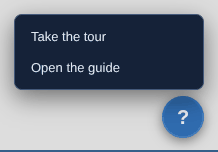
- Client accounts have a round ? button at the bottom right of the screen on a tablet or computer. It opens a small menu with Take the tour and Open the guide.
- Client and engineer accounts have a profile menu at the top right. Click your photo or initials to open it. Its Help heading has Open the guide and Replay the tour. On a phone it has Open the guide only.
- Admin accounts have a Help button next to Sign out at the top right.
- The Sign In tab has a Help link under Forgot password?. It opens this section and the next one.
The tour
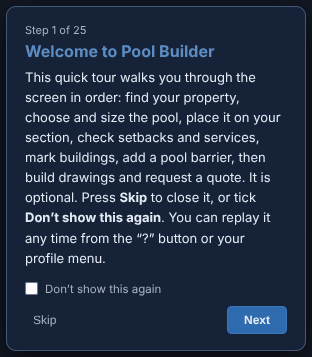
A short tour opens when a client account signs in on a tablet or computer. It points at each part of the screen in turn. Use Next and Back to move. Use Skip to close it at any point.
The tour is optional. Tick Don't show this again and it stays closed for your account, on every browser and device. You can replay it any time from the ? menu or the profile menu. The box shows ticked when you replay it. Untick it and the tour comes back each time you sign in.
The tour is matched to your kind of account. A free account is not taken through the Site Analysis steps, because Site Analysis is for subscribers. A trial account is not taken through Request Eng. Quote, because the trial does not send quote requests to us.
Engineers are not shown a tour when they sign in. The Engineering Jobs tab has a card that offers a short tour of the engineer tabs. Press Start the tour to take it. Press Don't show this again to close the card. You can replay the engineer tour from your profile menu.
Admin accounts have no tour. The tour does not open on a phone, because the phone is view only. Your quotes, clients and jobs are still there.
Signing in and your account
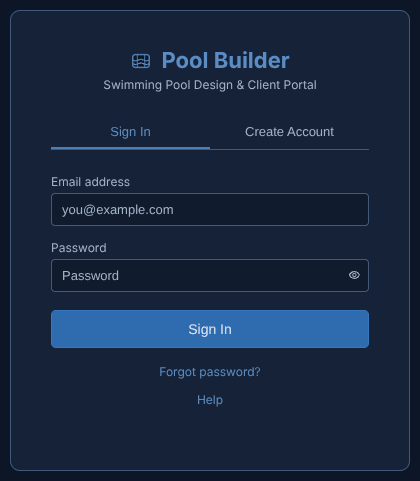
Sign in
- Open Pool Builder. The Sign In tab is the first one you see.
- Enter your Email address and Password, then press Sign In.
- If you have forgotten your password, press Forgot password?.
Create an account
- Open the Create Account tab.
- Fill in Full name, Email address, Phone number, Password and Confirm password.
- The password needs at least 8 characters, with an uppercase letter, a lowercase letter, a number and a special character. The list under the box ticks off each rule as you meet it.
- Choose an Account type. Choose Client: view and request quotes unless you are an engineer. Engineer: full design tool access accounts need admin approval before they can be used.
- Tick the box to agree to the Terms & Conditions, then press Create Account.
You may need to confirm your email address before you can sign in. If the email does not arrive, ask an admin to help.
A Trusted Partner invite
A Trusted Partner invite arrives as a link in an email. It works once and runs out after 30 days. The link opens the Create Account form with a green banner above it.
For an invite, the form also asks for your Pool manufacturer affiliation. Pick the manufacturer you work with from the list. If yours is not there, pick Other, which is last, and type the name in the box that appears. If you type a name under Other, the form shows the closest name from its list as you type. You can add your Company / trading name too. It is printed on your quotes.
An invite to join a team does not ask for a manufacturer or a company name.
The kinds of account
- Free. You can place a pool, use the Satellite and Street map layers, read My Summary, build drawings and send a quote request. Drawings show as a blurred preview. Site Analysis is greyed out and reads Site Analysis (Subscribe).
- Subscriber. You also get Site Analysis, clear drawings you can download and print, and the Jobs tab.
- Trusted Partner. You get everything a Subscriber gets. You also get the My Quotes and Clients tabs, your company logo on your drawings, trade credentials and your Lead link.
- Free trial. A Free account can start a 7-day trial from the Start 7-day free trial button at the top of the screen. The trial opens My Quotes and Clients for you to try. It holds up to 3 quotes and 5 clients. It cannot send a quote to a client, export, or hand a job to engineering. Drawings stay blurred.
- Engineer. You get the Engineering Jobs, Engineer tools and Standard Details tabs. You do not see Request Eng. Quote, because engineers receive quotes.
- Admin. You manage users, invites and the standard details library. An admin account is made from an admin invite link.

